With the continuous expansion of satellite television services, viewers are regularly introduced to new channels, updated broadcasts, and changing transmission configurations. Keeping track of these developments can help ensure that a receiver remains capable of finding the channels a viewer wants to watch.
Technical problems can occur for several reasons, ranging from outdated frequency information to weak signals or incorrect receiver settings. Identifying the actual cause before changing the configuration is an important step toward solving the problem without affecting other available channels.
This guide brings together practical knowledge about satellite channels and reception, giving readers a useful starting point for channel searches and technical adjustments. The information is presented with the goal of making satellite-related tasks easier to understand and apply.
The Astra 28.2°E satellite position is one of the most important satellite positions for viewers in the United Kingdom. It carries a wide range of British tv and radio services and is closely associated with popular satellite platforms such as Sky and Freesat.
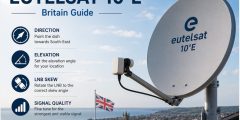
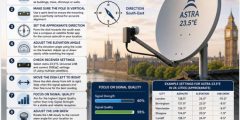
Whether you are installing a new satellite antenna, replacing an old LNB or trying to improve a weak transmission, accurate antenna positioning is essential. Even a small movement can affect reception, so setting the correct direction, elevation and LNB angle is the key to achieving a strong and steady transmission.
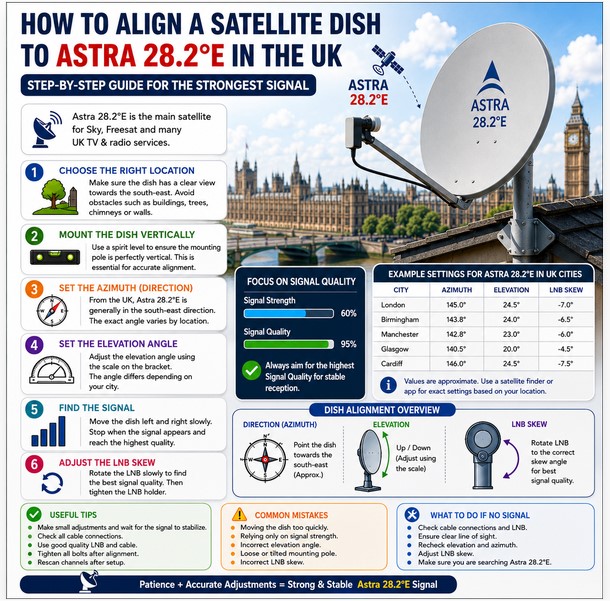
This guide explains the correct way to align a satellite antenna to Astra 28.2°E in the UK.
Choose the Best Location for the Satellite Dish
Before adjusting the antenna, make sure it is installed in a suitable location.
The antenna needs a sharp line of sight toward the satellite. In the UK, an Astra 28.2°E antenna generally points toward the south-east.
Avoid installing the antenna where the transmission path is blocked by:
- Tall structures.
- Trees and large branches.
- Chimneys.
- Walls.
- Nearby structures.
A sharp view is essential because even a relatively small obstacle can block or weaken the satellite transmission.
Make Sure the Mounting Pole Is Perfectly Vertical
One of the most common causes of positioning problems is an incorrectly installed mounting pole.
Before making any adjustments, use a spirit level to make sure the pole or wall bracket is completely vertical.
This is important because the elevation markings on the satellite antenna bracket are only accurate when the mounting pole is perfectly vertical. If the pole is leaning, the elevation setting will not provide the expected results.
Understanding the Astra 28.2°E Dish Direction
The Astra 28.2°E position is located east of the UK, but this does not mean that the antenna should point directly east.
From the United Kingdom, the antenna normally points toward the south-east, although the exact direction varies depending on your location.
For example, the required azimuth will be slightly various in:
- London.
- Birmingham.
- Manchester.
- Liverpool.
- Glasgow.
- Edinburgh.
- Cardiff.
- Belfast.
The further your configuration location changes, the more the azimuth and elevation settings can vary.
For this reason, it is always best to use a satellite positioning calculator or satellite finder application based on your exact location.
Setting the Correct Elevation Angle
The elevation angle determines how high above the horizon the satellite antenna should point.
In southern parts of the UK, the elevation angle is generally higher than in northern areas. This means a antenna installed in London will not necessarily use the same elevation setting as a antenna installed in Scotland.
Use the elevation scale on the antenna bracket as a starting point, then make small adjustments while monitoring the transmission clarity.
When adjusting the elevation:
- Loosen the elevation bolts slightly.
- Set the approximate angle.
- Move the antenna upward or downward very slowly.
- Wait for the device to refresh the transmission reading.
- Stop when the highest transmission clarity is reached.
Avoid making large movements. A small adjustment can make a significant difference.
Aligning the Dish from Left to Right
After setting the approximate elevation, slowly move the antenna horizontally to search for the satellite.
Move the antenna from left to right in very small steps.
When the device detects a transmission:
- Stop immediately.
- Wait for the transmission clarity to stabilize.
- Continue making very small adjustments.
- Find the position with the highest transmission clarity.
Do not move the antenna too quickly. Satellite receivers can take a few seconds to refresh the transmission meter, so moving too fast can cause you to pass the correct satellite position.
Focus on Signal Quality, Not Only Signal Strength
Many receivers display two various measurements:
- Signal Strength.
- Signal Quality.
Signal strength only shows that the device is detecting a transmission from the LNB. It does not always confirm that the antenna is pointing at the correct satellite.
Signal clarity is more important because it indicates that the device is successfully decoding the transmission.
When aligning Astra 28.2°E, always try to achieve the highest possible Signal Quality rather than focusing only on transmission strength.
Adjusting the LNB Skew
The LNB must also be positioned correctly.
The LNB skew is the angle at which the LNB is rotated inside its holder. The correct angle changes depending on your location in the UK.
After finding the Astra 28.2°E transmission:
- Loosen the LNB holder slightly.
- Rotate the LNB very slowly.
- Monitor the transmission clarity.
- Stop when the highest clarity is achieved.
- Tighten the holder securely.
Only small movements should be necessary. An incorrect LNB angle can reduce transmission clarity and make reception less reliable during bad weather.
Can You Use an Old Sky Dish for Astra 28.2°E?
In many cases, an old Sky satellite antenna can still be used for Astra 28.2°E because it was originally designed for reception from the same general satellite position.
However, the configuration may require additional work if:
- The antenna has been moved.
- The LNB is damaged.
- The wire is old or corroded.
- The LNB type is incompatible with your device.
- The antenna has been incorrectly aligned.
If the antenna has been untouched and is still properly positioned, you may only require to check the LNB, wire and device settings.
What to Do If There Is No Astra 28.2°E Signal
If your device shows no transmission, check the following:
- Make sure the satellite wire is securely connected.
- Inspect the LNB for visible damage.
- Check the wire for cuts, cracks or water damage.
- Make sure the device has the correct LNB settings.
- Check that the antenna has a sharp line of sight.
- Confirm that the mounting pole is vertical.
- Recheck the elevation angle.
- Move the antenna slowly from left to right.
- Adjust the LNB skew.
- Make sure you are searching for the correct satellite.
If a transmission appears but the expected channels are missing, the antenna may be pointed at a various satellite position.
Common Mistakes When Aligning Astra 28.2°E
Several common mistakes can prevent successful satellite reception.
Moving the Dish Too Quickly
Fast movements can cause you to miss the satellite. Always make small adjustments and wait for the transmission meter to refresh.
Using the Wrong Signal Meter
Some users rely only on transmission strength. Always check transmission clarity to confirm successful reception.
Ignoring LNB Position
A poorly adjusted LNB can reduce reception clarity even when the antenna is correctly aligned.
Incorrect Mounting Pole
A tilted pole can make the elevation scale inaccurate and make the positioning process much more difficult.
Tightening the Bolts Too Early
Do not fully tighten the antenna before completing fine adjustments. Leave the bolts slightly loose until the highest possible transmission clarity has been found.
How to Get a Stronger and More Stable Astra Signal
For the best results, follow these recommendations:
- Use a suitable satellite antenna for your location.
- Install the antenna on a strong and steady mount.
- Use a good-clarity LNB.
- Replace damaged or old cables.
- Keep the wire connections protected from moisture.
- Avoid unnecessary wire joins.
- Maintain a sharp line of sight to the satellite.
- Adjust the antenna in very small movements.
- Focus on transmission clarity.
- Check the transmission again after tightening all bolts.
Final Check After Aligning the Dish
After reaching the best transmission clarity, carefully tighten all mounting bolts.
Tightening the bolts can slightly move the antenna, so check the transmission meter again after each bolt is secured.
Once the antenna is fully tightened, perform a channel search on your device.
If the expected Astra 28.2°E services are found and the transmission remains steady, the configuration has been successfully completed.
Difference Between Free-to-Air and Encrypted Satellites
- Free-to-air channels can normally be received without a paid access subscription.
- Encrypted services require authorized access through the broadcaster or service provider.
- Both types may use similar satellite transmission technology but differ in access requirements.
- Always use legitimate subscriptions and compatible equipment for encrypted services.